One workspace for your team and its agents.
Tasks, docs and meetings, plus modules for running the rest of a business, in an open-source app you host yourself. Agents connect over MCP and can do only what the person behind them can.
Tasks, docs, meetings and time.
Projects and tasks, a wiki, meetings and time tracking, in one place your agents can read too. Press C to create a task and ⌘K to find anything.
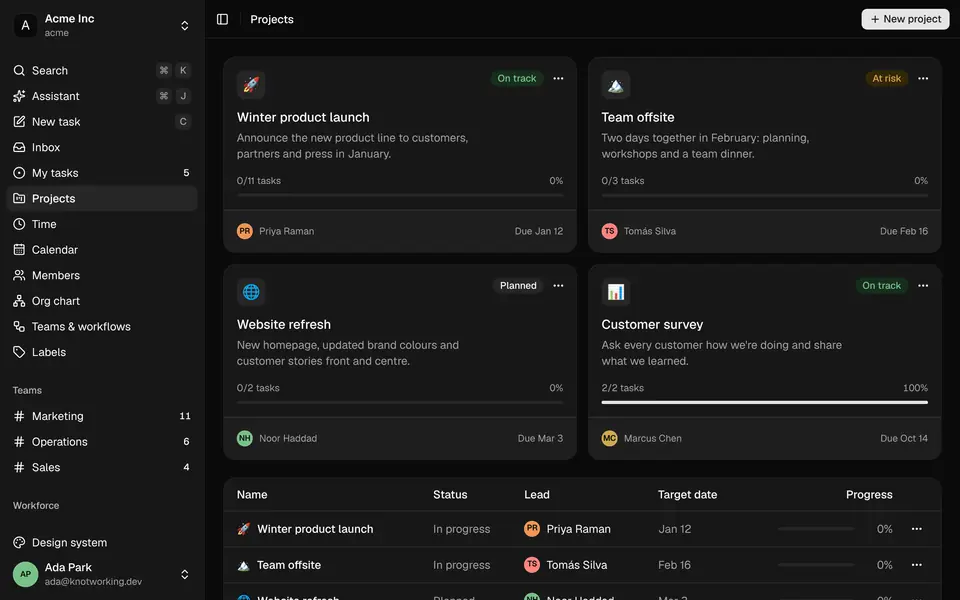
Projects cut across teams, with a lead, a target date, a health rating and progress that moves as tasks close.
Agents get a person's access, or less.
Every agent signs in with a person's token. Pick a token below to see what it can and can't do.
Whose token
Scope
Owner settings
1 of 8 requests allowed for Marcus’s token
List this week's open tasks: allowed.
Allowed, and recorded against Marcus's token.
list_tasksComment on a task: refused.
Read-only token. Only GET requests get through.
create_commentLog two hours on a task: refused.
Read-only token. Only GET requests get through.
log_timeEdit a handbook page: refused.
Read-only token. Only GET requests get through.
update_documentCheck stock levels: refused.
Marcus has no access to Stock, so neither does the token.
get_stock_levelsSend a purchase order: refused.
Marcus has no access to Purchasing, so neither does the token.
send_purchase_orderApprove a recipe version: refused.
Approvals and sign-offs are never offered to tokens. A person does these in the app.
Sign off a food-safety check: refused.
Approvals and sign-offs are never offered to tokens. A person does these in the app.
How's the winter launch looking? If anything's slipping, nudge whoever owns it.
list_projects{ "query": "winter" }
Winter product launch, in progress, due 11 Jan
list_tasks{ "project": "Winter product launch", "state": "open" }
4 open, 1 in review
get_time_report{ "group_by": "task", "period": "this_week" }
8h 30m on the launch
create_comment{ "task": "Design launch announcement graphics", … }
Comment added as Ada Park
On track: four open tasks and 8½ hours logged this week. The announcement graphics have sat in review since Monday, so I've asked Priya on the task to sign them off by Friday.
- Read-only by default
- A new token can only read. Writing is a box you tick, per token.
- Limited by module
- Untick a module and its tools disappear from the agent's list.
- Always expires
- After 30, 90, 180 or 365 days; 90 unless you choose. There is no never-expires option.
- Shown once, stored as a hash
- Revoke a token from the same page you made it on.
- Rate limited
- 120 tool calls a minute per token by default, and separate read and write limits on the API.
- Some actions need a person
- Approvals, sign-offs and safety records need a signed-in person, whatever the token allows.
More than 200 tools over MCP, from list_tasks to record_ccp_readings. Works with Claude Code, Claude Desktop and any client that speaks MCP. In the app, ⌘ J opens an assistant that runs on your own Claude Code. Connect an agent
Turn on only what you need.
Start with tasks and docs, and add people, operations or sales later. Turning a module off hides it and deletes nothing.
Work
Tasks, docs, time and meetings. On for everyone unless you narrow it.
People
Staff records, training, attendance and leave.
Operations
Food manufacturing, from ingredients and recipes to the records an inspector asks for.
Sales and finance
Customers, orders, despatch and accounting connections.
Run it yourself.
One Compose file, on a machine in the office or a small cloud server. No account with us and no per-seat bill.
Configure
Clone the repository and set three values: the address your team will use, a secret, and a database password.
terminal cp deploy/env.example deploy/.envStart
Docker Compose builds and runs Caddy, the web app, the API, Postgres and the MCP server. Migrations run on start.
terminal docker compose --env-file deploy/.env up -d --buildClaim it
The API logs a one-time setup link. Opening it creates the workspace and its owner, and stops anyone else on the network claiming it first.
terminal docker compose --env-file deploy/.env logs api | grep setupInvite and connect
Invite people by email or QR code. Each person can make a token and connect their agent.
terminal claude mcp add --transport http knotworking https://knot.example.com/mcp \ --header "Authorization: Bearer knw_…"
- Runs small
- 1 vCPU and 1–2 GB of RAM is plenty for a team of around 30.
- Your database
- The bundled Postgres, or a free Neon or Supabase project.
- Automatic HTTPS
- Point a domain at the server and Caddy gets and renews the certificate.
- Invite-only
- No public sign-up. Google, Microsoft and GitHub sign-in still only admit invited addresses.
Free and open source.
There is no hosted plan or support contract. The docs cover installing, running and connecting agents. The source will be on GitHub soon.
This has been in review since Monday and is due on the 17th. Priya, could you sign the graphics off by Friday?